The main window
The main window of the application is divided into a main menu, a workbench with multiple plots and a sophisticated editor. The user can work simultaneously on a number of different experiments, alias projects. They can be created, opened, selected and deleted via the main menu, by using the pull-down menus or the standard GUI icons. The way plots are shown on the workbench can also be changed via the main menu. Icons allow the user to add processes, samples or models to an experiment.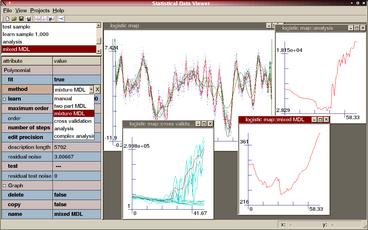
The main window
When a new project is created, a new main plot is put on the workbench and the project is loaded into the editor. The main plot will show all the processes, samples and models of an experiment. For each selection method used, a new plot is added which shows the predictions of that method. A plot initially has a white background and an x and an y-axis with normal scale. These properties can be changed.
Above the editor is a list box that contains all the objects of an experiment. Creating an object via the main menu, clicking on its graph in one of the plots or selecting it from the list box will load the object into the editor. Once in the editor, the attributes of an object can be evaluated and changed. The plots and the project itself are also in the list box and can be loaded into the editor as well.